
DDM
Arcade Fire website
In this project I learnt how to make a website as if I were making it for a company. I did this seriously, because if I were in the workforce I would have to be serious. I had to put together several things I have learnt before. This project has greatly improved my knowledge for HTML and CSS.
I also learnt to listen to instructions better, for I had to change things so it would be exactly like what the instructions said. I also learnt how to better design my website; I didn’t just make it serious, I made it look good. I added a red background to my hyperlinks, and I made the color palet good. I also learnt how to add videos to my website; now I know I can just get the embed code from the video, and I should not use youtube downloaders.
I do think that with this project I’ve truly improved my skills as a web designer. This project really challenged me to do better. I’m happy to see the progress I’ve made within a few months. I hope I can continue to improve from this point forward.
Cross Word Puzzle
For our Junior Year DDM we are supposed to make a Java program that can read a file with information on it, and uses that information to create a Crossword puzzle. We are supposed to make 5 classes, a clue, crossword, FileHandler, Main and a Square class. The main is the main program that runs everything. The FileHandler reads and splices up the information in the file for what it is needed for. The Square class gets every white and black square from the file. The Crossword uses all the squares to make the crossword itself. And the clue gets the clue you need to help you answer the crossword.
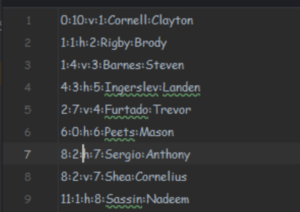
Above, is the file that helps create the crossword puzzle. The first number indicates the row it’s supposed to be on, and the second is the column it’s on. The letter h and v, indicates whether it’s vertical or horizontal. The least number is the number of the clue, and the name next to it is the actual answer. The last name on the list is the clue you get. So the clue for Sergio is Anthony.
FileHandler Class
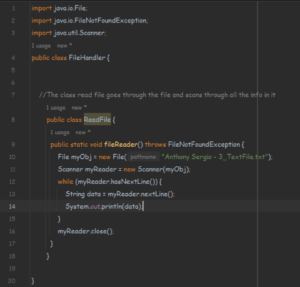
For the filehandler page I was able to make the class open up the file, then it read through the file. It creates a file object and the name is “myObj”. It goes through all the data on the file, through every line on the file it turns it into the String Date object and it prints it. It stops doing that when it runs out of lines on the file, and then it closes my reader. I was later going to give it the ability to not only read the file, but to also splice the information for uses in some of the other classes.
Main Class
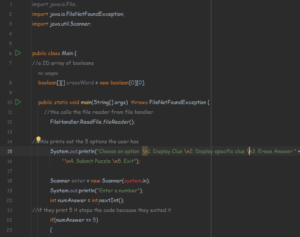
Above is my main class, on the top I created a 2D array of booleans. The array is supposed to represent the puzzle area. In the print statement it gives you 5 options, with the line being divided up using \n so it’s not overly long without overusing print statements. It is also able to call the fileReader from FileHandler. Below I was able to make it so when you enter an answer to the scanner, if it’s 5 you exit then closes the program. But when you answer anything that isn’t 1-5 you it prints “Wrong number, please enter one above”. I was planning on later adding answers 1 – 4 to function. So if you entered 4 it could submit the puzzle or if you entered 1 it would display a clue like Steven.
Crossword
For the crossword puzzle I was planning on this class to actually construct the Crossword puzzle. All the black squares would be represented with a *. All of the white squares would be blank for you to enter the words, except for the first character. It would start with the number the word represents. So if your clue is 6 Mason, the beginning of it would be 6.
Square Class
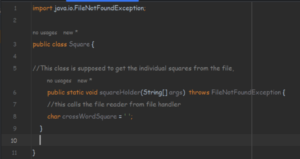
All I have made in the square class is a char class. It’s supposed to get square for the crossword. The crossword class used this to put together the puzzle itself. The reason I used Char rather than a string is because I only need 1 letter for every square, if I used a string it would be a waste.
Clue Class
The clue class above is supposed to collect the clue for the user. All I have so far is the empty string for the clue. It’s supposed to collect the clue, so when in the main class you enter 1 it displays all clues, or if it’s 2 it displays a specific clue.