Shop

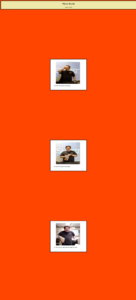
Photobooth Website


From the Photo Booth Website I learnt how to divide the body of the website into header, main and footer. I also learnt how to use margins and padding correctly to improve the design of the website. I learnt how to upload photos to the computer from the ipad. This made it so much easier, because I used to email myself the photo, but I had much difficulty with that.

I also learnt how to improve the design of my website. I learnt how to improve how I incorporate photos into my websites. I also learnt to improve how I manage my time. This also taught me to listen to directions better, because I had some trouble. But I learnt to just ask for help when needed.

April Vacation Website

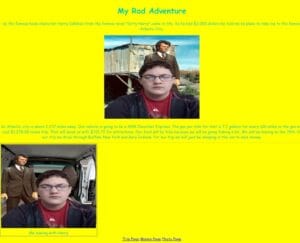
From the april vacation website I learnt a lot. I learnt how to do basic web design. I learnt about class tags, for my brother had shown me how to do them. I also learnt how to make the text align center and how to change the background color. I also improved my knowledge of making many web pages. I had to make things consistent with the hyperlinks; I just had to remember to add them all.

I also learnt how to do research for my website. I had to make a plan for a road trip, but I also had to plan the things we were going to be doing so I knew I could afford it with my funds. I had to create a story about me going on a roadtrip with a book character. We also had to incorporate photographs, so I used GIMP to edit photos together.

OC Website Redesign

From the OC Redesign, I learned a lot. I learned how to be more professional with them as if I were making websites for a company. I made the designs for the websites look appealing, while still fitting the original website. I also made the code itself more organized.

I learned how to follow the instructions better, for they were more strict. I had to spend a lot of time with the pages making the pictures and text fit in well, and more serious. I learned a lot about how real websites are made in this project. I also did things I’ve never done before, such as using classes to have the nav bar change colors to show you the page your on, or the one your


Lion’s Club Redesign

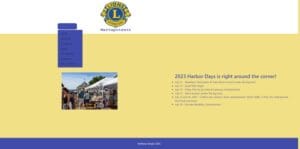
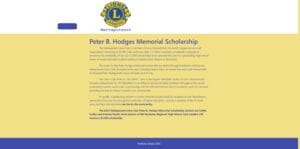
For the Lions’s Club website, I also learned bootstrap. So then I could make the header and footer easier and more consistent throughout the website. I also learned how to do a drop down menu, which is way more efficient than a navbar. I also got better with flex boxes and color schemes for that website.

I learned how to better understand the instructions better. The website needed to be professional, because the teacher was showing it to real people. I had to spend a lot of time making it true to the actual website, while looking better. What I learned from this is the expectations that real web designers have.
 

Video Game Website
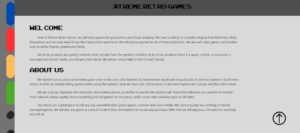
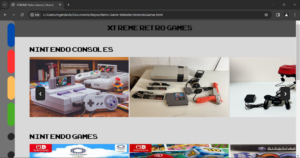
To the right are some pages to a website I worked on with a group of two others. It is meant to be a retro video game store. We have several pages to emulate a store front, a contact page, and an about us page. I worked on the styling and color scheme, my partner Landen Ingerslev worked on JQuery, and my other partner Nadeem Sassin was there for assistance.

We used visual studio to edit our website. We filled our website with images of video games and consoles, old and new. We exported an external font so that it would look nice and fit in with our gamer theme.

Housing Authority Website


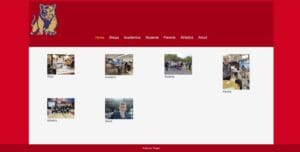
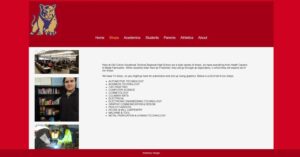
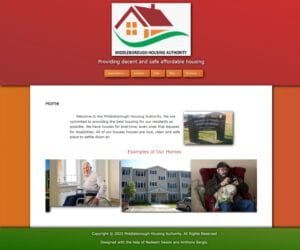
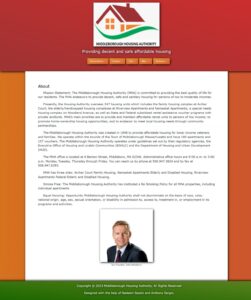
To the left is a website we made that was meant to be a remake of a website. It’s a local organization, so analyzing and remaking their website shows us not only who to make a website, but what a real one contains. We made the color scheme copy the logo, and we used slight gradients and shadows to make it feel less flat.

We used an image carousel and filled it with images of the interiors and exteriors of houses. We also combined several pages together so the page count could be lower and the nav bar smaller. I worked on it with Nadeem Sassin, which was the first time I collaborated with somebody on a website. So it helped to bounce ideas off each other. I did most of the styling, and he did the HTML mostly.


Senior Project Choose your own adventure

For senior year we need to work on a senior project. So my friend Nadeem and I decided to work on a choose your own adventure story website. I like to write and I like Westerns such as The Lone Ranger, Clint Eastwood, John Wayne, Terrence Hill and Bud Spencer. So for the story I wrote it in Google Docs, I used headers for each stories which used links to move to the part of the story you clicked on.

For the website mock-up we used Figma to get a basic idea of what it would look like. We used a wild west font and wood background for it. We also used Figma to make a flow chart for the story.

The story is called the Lost Vein of Gold, and it’s a bout a young man who was told by his dying father where to find some lost rebel gold. So it is up to you to go on an adventure to find the gold. You can either be an honorable or dishonorable man on it. There are some choices however that might lead in an early ending in the story. This whole thing was based off of the Chose Your Own Adventure series of books. This project has been a fun thing to work on with Nadeem, I like writing the story because it gives me a good excuse to rewatch my favorite westerns for inspiration and I got to collaborate with my friend.

Restaurant Website

We were using WordPress to make websites, but our teacher Mr. Riley wanted us to refresh ourselves with making websites using traditional HTML and CSS. I wanted to learn how to use W3.CSS which is a Bootstrap alternative made by W3.Schools.

I based the site after this great restaurant I ate at with my brother and my dad in Gettysburg. We went there because I love Civil War History and my brother and dad like history in general. The restaurant we ate at was the Blue & Gray Bar and Grill so I called my the Civil “Ware” Eatery.

It was fun thinking of civil war food puns of Generals and Battles. I also liked using the W3.CSS, it was really easy to learn and apply to my websites styling.